

前兩天走的是往內看: prompt 是那一句 (Day 06), context 是模型讀到的所有東西 (Day 07). 今天往外看一層.
Context 不是憑空出現在模型面前的. 有一個系統負責:
這一整套叫 harness, 是包裹 LLM 的完整基礎設施. 模型只提供智慧, harness 提供控制.
LangChain 官方有一組實測: 只改 harness、不換模型, 一個 coding agent 從排行榜前 30 名外跳到前 5 名. 這個數字很嚇人, 但方向對: 效能大頭不在模型本身.
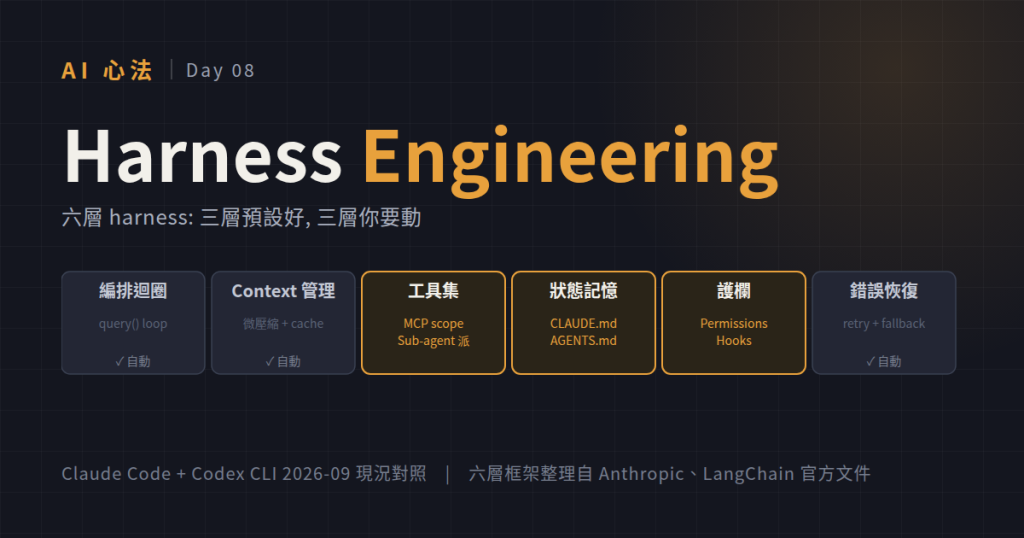
不管哪家 harness, 骨架都是這六塊:
| 層 | 做什麼 |
|---|---|
| 編排迴圈 | 主循環: 呼叫模型 → 執行工具 → 判斷停止 → 重來 |
| Context 管理 | 每輪決定塞什麼、壓縮什麼、清空什麼 |
| 工具集 | 模型能呼叫的 tool: bash / read / grep / MCP 等 |
| 狀態與記憶 | in-context (單輪) / short-term (跨輪) / long-term (跨 session) / external |
| 護欄 | 執行前檢查、執行中攔截、輸出前驗證 |
| 錯誤恢復 | Retry、fallback、部分完成、人工介入 |
Day 07 的 Context Engineering 其實是第二層 (Context 管理) 加第四層 (狀態記憶) 的組合. 這一天把周圍的四層一起補上.
短答: 六大組成裡, 幾乎全部預設就有. 你不用寫任何一行 harness code, 開 Claude Code 進去就用.
| 層 | Claude Code 內建 | Codex CLI 內建 |
|---|---|---|
| 編排迴圈 | query() async generator + mutable state |
Codex core agent loop, Item / Turn / Thread |
| Context 管理 | 微壓縮 (每輪) + 反應式壓縮 (滿了觸發) + 5 分鐘 prompt cache | Thread resume/fork/archive + compaction |
| 工具集 | ~43 內建 tool + MCP | 內建 + MCP + sandbox |
| 狀態與記憶 | 對話自動存 + CLAUDE.md + MEMORY.md (~200 行) | AGENTS.md + plugins |
| 護欄 | 權限系統 (deny/allow/classifier) + Hooks (PreToolUse / PostToolUse / Stop / SubagentStop / PreCompact) | Approval policy + sandbox modes |
| 錯誤恢復 | Circuit breaker (compaction 連錯 3 次停) + context overflow collapse + 529 fallback | 內建 retry + sandbox 隔離 |
2023 年真的要自己寫的 retry、compaction、tool 呼叫循環、sandbox 隔離, 現在都在 harness 裡. 這也是為什麼從 2024 之後「一般人也能用 agent」變成事實.
前面表格全自動的部分不用管. 你能動 (也需要動) 的其實只有這四個:
一、CLAUDE.md / AGENTS.md, 常駐規則
每輪自動注入, 適合放專案風格、禁止事項、你希望它每次都記得的事. Day 07 例一那個 refactor 從三輪變一輪, 就是這件事在做.
二、Permissions + Hooks, 攔截點
Permissions 決定哪些工具動作要問你、哪些不用. allow all Read/Grep, ask on Write 是最常見設定, 大幅減少互動摩擦. Hooks 更進一步: 用 shell 指令綁定 lifecycle 事件, 例如每次 Write 後自動跑 lint、每次 commit 前自動跑測試.
三、MCP scope, 你接哪些外部服務
每個 MCP 都吃 context (見 Day 07 例二: 20 個 MCP 每輪多吃 5K 到 10K tokens). 挑最相關的 3 到 5 個就好. Claude Code 支援 project-level 設定, 特定 repo 才掛 GitHub MCP.
四、Sub-agent 什麼時候派
Explore、Plan 是 Claude Code 內建的 sub-agent, 打「幫我找 X」它會自動派. 自訂 sub-agent 用 AgentTool 呼叫. 什麼時候該派: 會產生大量中間結果的任務 (搜尋、探索、驗證), 派給 sub-agent, 只把結論回主對話.
其他你都不用管. 這是重點.
例一: Hook 讓 commit 訊息格式強制對
.claude/hooks/pre-commit.sh 綁 PostToolUse (Bash + git commit), 檢查 message 有沒有符合 project 規範 (中文、動詞開頭、附 Co-Authored-By). 不對就中止. 這樣不用每次 code review 提醒 commit message, harness 幫你擋掉.
例二: Permissions 設對, 減少 80% 的互動打斷
預設每次 tool 呼叫都問你. 活躍的 refactor 任務一小時可以問你幾十次. settings.json 加:
{
  "permissions": {
    "allow": ["Read", "Grep", "Glob", "Bash(git status)", "Bash(git diff)"],
    "ask": ["Write", "Edit", "Bash(git commit)"]
  }
}
Read / Grep 完全不打擾, 要寫入才問. 節省的時間非常明顯.
例三: Explore sub-agent 找函式定義, 主 context 不被搜尋結果污染
打「幫我找專案裡所有處理 auth 的地方」, Claude Code 會派 Explore sub-agent 去 grep 全 repo, 只回一個幾百 tokens 的摘要到主對話. 如果你直接在主對話 Grep, 那幾千行搜尋結果會全部留在 context 裡, 之後每輪都被讀一次.
上面例子都是 Claude Code. 如果你用的是 web chat (Claude.ai、ChatGPT、Gemini), web app 本身就是一個 harness, 只是形狀跟 Claude Code 不同: 沒有 hooks、沒有 permissions 規則、沒有 worktree, 但也不用你配那些. 你要動的四個位置在 web chat 上都有對應:
| Claude Code 上你要動的 | Web chat 對應 |
|---|---|
| CLAUDE.md / AGENTS.md | Custom Instructions / Claude Projects Instructions / ChatGPT Custom GPT instructions |
| Permissions + Hooks | 沒有 hooks; 但每則訊息可 toggle 啟用哪些工具 (web search、artifacts、extended thinking 等) |
| MCP scope | Claude Connectors (Notion、GDrive、Slack…) / ChatGPT GPT Actions / Gemini Extensions |
| Sub-agent 派出去 | Custom GPTs / Claude Projects 當「專用助手」, 分不同 context |
具體幾條:
既然預設都做好了, 為什麼還要懂:
Harness 是模型的鎧甲: 你不用打造, 但要知道它有哪些關節. 認得關節, 就知道哪裡要綁緊、哪裡不能硬砸.


 iThome鐵人賽
 看影片追技術